We use cookies Some cookies are needed to run the shop. With your consent we also use analytics and marketing cookies from Google. Cookie policy


General
The NavInc interfaces allows you connecting video sources to the original Mercedes Comand NTG5 systems.
Features
# RGB input (Connecting external navigation system)
# 2x Audio/Video input (connect video sources like DVB-T / DVD / iPod)
# 1x HDMI input (connect HDMI soursec like Mirrorlink / Apple TV / Chromecast)
# Camera input (connecting reversing camera)
# Front camera input (auto switch)
# Video output (connect headrest screens)
# NTSC support
# Audio output (audio link to the original audio system)
# Image retention while driving
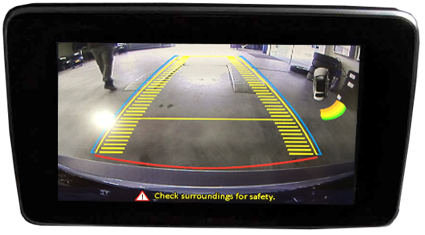
# Adjustable parking lines
# Video output (connect headrest screens)
# NTSC support
# Audio output (audio link to the original audio system)
# Image retention while driving
# Adjustable parking lines
# iPAS function (intelligent Park Assist System)
# Split screen (camera en OEM parking sensors)
# Touch screen support (for external touch glass)
# Touch screen support (for external touch glass)
Activation
Video image switching through the vehicle genuine OEM controls.
Touchpad
HOME button short: back to OEM
RETURN button short: back to OEM
RETURN button long: toggle RGB-HDMI-AV1-AV2-OEM

Comand
NAVI button short: back to OEM
NAVI button short: back to OEM
NAVI button long: toggle RGB-HDMI-AV1-AV2-OEM
Steering wheel
RETURN button short: back to OEM
RETURN button long: toggle RGB-HDMI-AV1-AV2-OEM
RETURN button short: back to OEM
RETURN button long: toggle RGB-HDMI-AV1-AV2-OEM

OSD menu
Via de interface menu kunnen diverse instellingen worden afgeregeld voor een zo optimaal beeld, namelijk;
Tint
Helderheid
Contrast
Scherpte
Parking assistance
- PDC illustration; parking distance control (Radar)
- Parking flexible dinamic guide lines; they move theirselves when you turn the steering wheel (iPAS)
- Picture in Picture; shows PDC illustration + rear view camera image in one screen (PIP)
Device control
Possibility to use the OEM Comand controller to control the external AV source.
Additional information:
- Check at the tab “compatibility” on top of this page if your radio or navigation system is suitable for this product.
- Audio of the connected video source must be linked to the AUX input of car, FM modulator, USB or iPod interface.
- No constant voltage needed (+30) therefore the interface is much more stable.
- Audio of the connected video source must be linked to the AUX input of car, FM modulator, USB or iPod interface.
- No constant voltage needed (+30) therefore the interface is much more stable.
- ”Mute” function for the video inputs which are not used.
- Use of a metal casing and new components (not Chinese or remanufactured components).
- Use of a metal casing and new components (not Chinese or remanufactured components).
A Class (W176)
2015-04/2018
- Note: *iPAS option wont work when the car does not have OEM parking sensors.
- Open head-unit
- Head-unit
Audio 20 Garmin (7.0") & Comand (8.0"/10.2") - Touch support
Glass - R-gear select
Lamp & CAN - iPAS lines
- Picture in Picture (PiP)
- I-DRV
- Guide lines
- CVBS signal
NTSC - Rear camera input
- Signal
LVDS - Activation
Switch & OEM - A/V output
- A/V input
- HDMI input
- LVDS input
- RGB input
- Front camera input
B Class (W246)
2015-11/2018
- Note: *iPAS option wont work when the car does not have OEM parking sensors.
- Open head-unit
- Head-unit
Audio 20 Garmin (7.0") & Comand (8.0"/10.2") - Touch support
Glass - R-gear select
Lamp & CAN - iPAS lines
- Picture in Picture (PiP)
- I-DRV
- Guide lines
- CVBS signal
NTSC - Rear camera input
- Signal
LVDS - Activation
Switch & OEM - A/V output
- A/V input
- HDMI input
- LVDS input
- RGB input
- Front camera input
C Class (W205)
2014-06/2018
- Note: Touchpad support (TS-CON-MB) / *iPAS option wont work when the car does not have OEM parking sensors.
- Open head-unit
- Head-unit
Audio 20 Garmin (7.0") & Comand (8.0"/10.2") - Touch support
Glass - R-gear select
Lamp & CAN - iPAS lines
- Picture in Picture (PiP)
- I-DRV
- Guide lines
- CVBS signal
NTSC - Rear camera input
- Signal
LVDS - Activation
Switch & OEM - A/V output
- A/V input
- HDMI input
- LVDS input
- RGB input
- Front camera input
C Class Coupe (C205)
2015-20..
- Note: *iPAS option wont work when the car does not have OEM parking sensors.
- Open head-unit
- Head-unit
Audio 20 Garmin (7.0") & Comand (8.0"/10.2") - Touch support
Glass - R-gear select
Lamp & CAN - iPAS lines
- Picture in Picture (PiP)
- I-DRV
- Guide lines
- CVBS signal
NTSC - Rear camera input
- Signal
LVDS - Activation
Switch & OEM - A/V output
- A/V input
- HDMI input
- LVDS input
- RGB input
- Front camera input
CLA Class
2015-02/2019
- Note: *iPAS option wont work when the car does not have OEM parking sensors.
- Open head-unit
- Head-unit
Audio 20 Garmin (7.0") & Comand (8.0"/10.2") - Touch support
Glass - R-gear select
Lamp & CAN - iPAS lines
- Picture in Picture (PiP)
- I-DRV
- Guide lines
- CVBS signal
NTSC - Rear camera input
- Signal
LVDS - Activation
Switch & OEM - A/V output
- A/V input
- HDMI input
- LVDS input
- RGB input
- Front camera input
CLS Class (C218)
2015-2018
- Note: *iPAS option wont work when the car does not have OEM parking sensors.
- Open head-unit
- Head-unit
Audio 20 Garmin (7.0") & Comand (8.0"/10.2") - Touch support
Glass - R-gear select
Lamp & CAN - iPAS lines
- Picture in Picture (PiP)
- I-DRV
- Guide lines
- CVBS signal
NTSC - Rear camera input
- Signal
LVDS - Activation
Switch & OEM - A/V output
- A/V input
- HDMI input
- LVDS input
- RGB input
- Front camera input
CLS Class Shooting
08/2014-2019
- Note: *iPAS option wont work when the car does not have OEM parking sensors.
- Open head-unit
- Head-unit
Audio 20 Garmin (7.0") & Comand (8.0"/10.2") - Touch support
Glass - R-gear select
Lamp & CAN - iPAS lines
- Picture in Picture (PiP)
- I-DRV
- Guide lines
- CVBS signal
NTSC - Rear camera input
- Signal
LVDS - Activation
Switch & OEM - A/V output
- A/V input
- HDMI input
- LVDS input
- RGB input
- Front camera input
E Class (C207 Coupe)
11/2014-2016
- Note: *iPAS option wont work when the car does not have OEM parking sensors.
- Open head-unit
- Head-unit
Audio 20 Garmin (7.0") & Comand (8.0"/10.2") - Touch support
Glass - R-gear select
Lamp & CAN - iPAS lines
- Picture in Picture (PiP)
- I-DRV
- Guide lines
- CVBS signal
NTSC - Rear camera input
- Signal
LVDS - Activation
Switch & OEM - A/V output
- A/V input
- HDMI input
- LVDS input
- RGB input
- Front camera input
E Class (W212)
11/2014-08/2017
- Note: *iPAS option wont work when the car does not have OEM parking sensors.
- Open head-unit
- Head-unit
Audio 20 Garmin (7.0") & Comand (8.0"/10.2") - Touch support
Glass - R-gear select
Lamp & CAN - iPAS lines
- Picture in Picture (PiP)
- I-DRV
- Guide lines
- CVBS signal
NTSC - Rear camera input
- Signal
LVDS - Activation
Switch & OEM - A/V output
- A/V input
- HDMI input
- LVDS input
- RGB input
- Front camera input
GLA Class
2015-20..
- Note: *iPAS option wont work when the car does not have OEM parking sensors.
- Open head-unit
- Head-unit
Audio 20 Garmin (7.0") & Comand (8.0"/10.2") - Touch support
Glass - R-gear select
Lamp & CAN - iPAS lines
- Picture in Picture (PiP)
- I-DRV
- Guide lines
- CVBS signal
NTSC - Rear camera input
- Signal
LVDS - Activation
Switch & OEM - A/V output
- A/V input
- HDMI input
- LVDS input
- RGB input
- Front camera input
GLC Class
2015-2019
- Note: *iPAS option wont work when the car does not have OEM parking sensors.
- Open head-unit
- Head-unit
Audio 20 Garmin (7.0") & Comand (8.0"/10.2") - Touch support
Glass - R-gear select
Lamp & CAN - iPAS lines
- Picture in Picture (PiP)
- I-DRV
- Guide lines
- CVBS signal
NTSC - Rear camera input
- Signal
LVDS - Activation
Switch & OEM - A/V output
- A/V input
- HDMI input
- LVDS input
- RGB input
- Front camera input
GLE Class (W166)
2015-2018
- Note: *iPAS option wont work when the car does not have OEM parking sensors.
- Open head-unit
- Head-unit
Audio 20 Garmin (7.0") & Comand (8.0"/10.2") - Touch support
Glass - R-gear select
Lamp & CAN - iPAS lines
- Picture in Picture (PiP)
- I-DRV
- Guide lines
- CVBS signal
NTSC - Rear camera input
- Signal
LVDS - Activation
Switch & OEM - A/V output
- A/V input
- HDMI input
- LVDS input
- RGB input
- Front camera input
GLE Class (W166)
2018-20..
- Note: *iPAS option wont work when the car does not have OEM parking sensors.
- Open head-unit
- Head-unit
Audio 20 Garmin (7.0") & Comand (8.0"/10.2") - Touch support
Glass - R-gear select
Lamp & CAN - iPAS lines
- Picture in Picture (PiP)
- I-DRV
- Guide lines
- CVBS signal
NTSC - Rear camera input
- Signal
LVDS - Activation
Switch & OEM - A/V output
- A/V input
- HDMI input
- LVDS input
- RGB input
- Front camera input
GLK Class (X204)
2015-2018
- Note: *iPAS option wont work when the car does not have OEM parking sensors.
- Open head-unit
- Head-unit
Audio 20 Garmin (7.0") & Comand (8.0"/10.2") - Touch support
Glass - R-gear select
Lamp & CAN - iPAS lines
- Picture in Picture (PiP)
- I-DRV
- Guide lines
- CVBS signal
NTSC - Rear camera input
- Signal
LVDS - Activation
Switch & OEM - A/V output
- A/V input
- HDMI input
- LVDS input
- RGB input
- Front camera input
GLS Class (X166)
2015-2018
- Note: *iPAS option wont work when the car does not have OEM parking sensors.
- Open head-unit
- Head-unit
Audio 20 Garmin (7.0") & Comand (8.0"/10.2") - Touch support
Glass - R-gear select
Lamp & CAN - iPAS lines
- Picture in Picture (PiP)
- I-DRV
- Guide lines
- CVBS signal
NTSC - Rear camera input
- Signal
LVDS - Activation
Switch & OEM - A/V output
- A/V input
- HDMI input
- LVDS input
- RGB input
- Front camera input
GT Class (C190)
2015-2018
- Note: *iPAS option wont work when the car does not have OEM parking sensors.
- Open head-unit
- Head-unit
Audio 20 Garmin (7.0") & Comand (8.0"/10.2") - Touch support
Glass - R-gear select
Lamp & CAN - iPAS lines
- Picture in Picture (PiP)
- I-DRV
- Guide lines
- CVBS signal
NTSC - Rear camera input
- Signal
LVDS - Activation
Switch & OEM - A/V output
- A/V input
- HDMI input
- LVDS input
- RGB input
- Front camera input
S Class (W222)
2013-2017
- Note: *iPAS option wont work when the car does not have OEM parking sensors.
- Open head-unit
- Head-unit
Audio 20 Garmin (7.0") & Comand (8.0"/10.2") - Touch support
Glass - R-gear select
Lamp & CAN - iPAS lines
- Picture in Picture (PiP)
- I-DRV
- Guide lines
- CVBS signal
NTSC - Rear camera input
- Signal
LVDS - Activation
Switch & OEM - A/V output
- A/V input
- HDMI input
- LVDS input
- RGB input
- Front camera input
S Class Coupe (C217)
2013-2017.
- Note: *iPAS option wont work when the car does not have OEM parking sensors.
- Open head-unit
- Head-unit
Audio 20 Garmin (7.0") & Comand (8.0"/10.2") - Touch support
Glass - R-gear select
Lamp & CAN - iPAS lines
- Picture in Picture (PiP)
- I-DRV
- Guide lines
- CVBS signal
NTSC - Rear camera input
- Signal
LVDS - Activation
Switch & OEM - A/V output
- A/V input
- HDMI input
- LVDS input
- RGB input
- Front camera input
SL Class Coupe (R231)
10/2015-20..
- Note: *iPAS option wont work when the car does not have OEM parking sensors.
- Open head-unit
- Head-unit
Audio 20 Garmin (7.0") & Comand (8.0"/10.2") - Touch support
Glass - R-gear select
Lamp & CAN - iPAS lines
- Picture in Picture (PiP)
- I-DRV
- Guide lines
- CVBS signal
NTSC - Rear camera input
- Signal
LVDS - Activation
Switch & OEM - A/V output
- A/V input
- HDMI input
- LVDS input
- RGB input
- Front camera input
SLC-class (R172)
2016-20..
- Note: *iPAS option wont work when the car does not have OEM parking sensors.
- Open head-unit
- Head-unit
Audio 20 Garmin (7.0") & Comand (8.0"/10.2") - Touch support
Glass - R-gear select
Lamp & CAN - iPAS lines
- Picture in Picture (PiP)
- I-DRV
- Guide lines
- CVBS signal
NTSC - Rear camera input
- Signal
LVDS - Activation
Switch & OEM - A/V output
- A/V input
- HDMI input
- LVDS input
- RGB input
- Front camera input
V Class (W447)
2014-20..
- Note: Touchpad support (TS-CON-MB) / *iPAS option wont work when the car does not have OEM parking sensors.
- Open head-unit
- Head-unit
Audio 20 Garmin (7.0") & Comand (8.0"/10.2") - Touch support
Glass - R-gear select
Lamp & CAN - iPAS lines
- Picture in Picture (PiP)
- I-DRV
- Guide lines
- CVBS signal
NTSC - Rear camera input
- Signal
LVDS - Activation
Switch & OEM - A/V output
- A/V input
- HDMI input
- LVDS input
- RGB input
- Front camera input
X Class (BR470)
11/2017-20..
- Note: Touchpad support (TS-CON-MB) / *iPAS option wont work when the car does not have OEM parking sensors.
- Open head-unit
- Head-unit
Audio 20 Garmin (7.0") & Comand (8.0"/10.2") - Touch support
Glass - R-gear select
Lamp & CAN - iPAS lines
- Picture in Picture (PiP)
- I-DRV
- Guide lines
- CVBS signal
NTSC - Rear camera input
- Signal
LVDS - Activation
Switch & OEM - A/V output
- A/V input
- HDMI input
- LVDS input
- RGB input
- Front camera input
Suitable for the following models
Mercedes
| A Class (W176) | 2015-20.. | Audio 20 Garmin (7.0") & Comand (8.0"/10.2") |
| B Class (W246) | 2015-20.. | Audio 20 Garmin (7.0") & Comand (8.0"/10.2") |
| C Class (W205) | 2014-20.. | Audio 20 Garmin (7.0") & Comand (8.0"/10.2") |
| C Class Coupe (C205) | 2015-20.. | Audio 20 Garmin (7.0") & Comand (8.0"/10.2") |
| CLA Class | 2015-20.. | Audio 20 Garmin (7.0") & Comand (8.0"/10.2") |
| CLS Class (C218) | 2015-20.. | Audio 20 Garmin (7.0") & Comand (8.0"/10.2") |
| CLS Class Shooting | 2015-20.. | Audio 20 Garmin (7.0") & Comand (8.0"/10.2") |
| E Class (C207 Coupe) | 2015-2016 | Audio 20 Garmin (7.0") & Comand (8.0"/10.2") |
| E Class (W212) | 2015-2016 | Audio 20 Garmin (7.0") & Comand (8.0"/10.2") |
| GLC Class | 2015-20.. | Audio 20 Garmin (7.0") & Comand (8.0"/10.2") |
| GLK Class (X204) | 2015-20.. | Audio 20 Garmin (7.0") & Comand (8.0"/10.2") |
| GLA Class | 2015-20.. | Audio 20 Garmin (7.0") & Comand (8.0"/10.2") |
| GLE Class (W166) | 2015-20.. | Audio 20 Garmin (7.0") & Comand (8.0"/10.2") |
| S Class (W222) | 2013-20.. | Audio 20 Garmin (7.0") & Comand (8.0"/10.2") |
| S Class Coupe (W217) | 2014-201.. | Audio 20 Garmin (7.0") & Comand (8.0"/10.2") |
| V Class | 2014-20.. | Audio 20 Garmin (7.0") & Comand (8.0"/10.2") |
| *iPAS option wont work when the car does not have OEM parking sensors. | ||
Remarks:
- Installation also possible in combination with original TV Tuner.
- AUX-output of the interface needs to be connected with AUX input of the car.
- Also possible to use the interface stand alone for reversing and/or forward driving camera function.
- Automatic switching to camera on navigation level.
Start a Conversation
Hi! Click one of our members below to chat on WhatsApp
- The team typically replies in a few minutes.