We use cookies Some cookies are needed to run the shop. With your consent we also use analytics and marketing cookies from Google. Cookie policy

DESCRIPTION
General
The NavInc NAVconnect interfaces allow for connecting video sources to the original Landrover DUO screens (10.1").
The interface is equipped with various options such as; 1* LVDS input, 1* Front camera input & 1* Rear camera input.
Example video
Features
- 1x Rear camera input
- 1x Front camera input (with auto switch OFF)
- 1x LVDS input
- Adjustubele parking lines via OSD menu
- iPAS (moveable grid lines)
- 3 Year warranty & Support
EXCLUSIVE INTERFACE FEATURES

Features:
- OEM button support
- Rear camera input (CVBS - NTSC)
- iPAS lines (moveable grid lines)
- Front camera input (CVBS - NTSC)
- Time delay setting front camera input (3-15sec)
- OSD menu (to adjust interface settings)
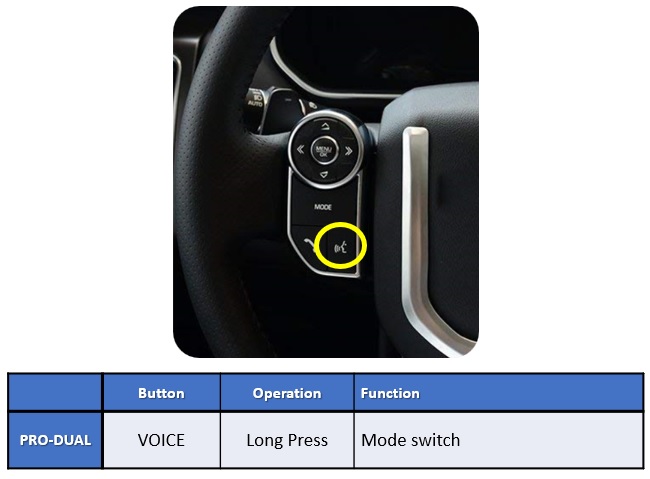
NAVconnect OEM Button
CAMERA FEATURES
Rear camera input with Parking guidelines
Rear camera input with parking guidleines option.
The guidelines makes it much easier to determine the distance to the object you are driving towards.
The guidelines are adjustable horizontal as well as vertical so the lines can be adjusted to the car.

Front camera input
Front camera input which will be selected after leaving the reverse gear.
Via the OSD menu you can select show time:
3 sec
5 sec
10 sec
15 sec
NOTES
- We recommend that the installation will be performed by a qualified specialist
- Check the other tabs for "Compatibility" - "Package contents" - "Product specifications"
LEGAL INFORMATION
The driver ofthe vehicle should not be inferred from the motion images. In many countries, watching movies while driving is prohibited. Therefore we accept no responsibility for material or personal injuries, directly or indirectly, due to installation of the interface modules.
Interface and Software basic information:
The NavInc interfaces are no navigation systems or screens to replace the navigation system. The NavInc interfaces enable the possibilities to connect different Audio/Video sources to the navigation system.
The NavInc interfaces are no navigation systems or screens to replace the navigation system. The NavInc interfaces enable the possibilities to connect different Audio/Video sources to the navigation system.
Manufacturers create adjusted software and hardware versions, options and enhancements which ensures that the compatibility of the products cannot be guaranteed 100%. Compatibility lists are based on customer feedback and experiences and will constantly be updated for optimal customer support.
RANGE ROVER EVOQUE
2019-20..
- Note: HDMI input only with IF-RR-6GH
- Open head-unit
- Head-unit
Incontrol Touch Pro DUO (10.2") - Touch support
Yes - R-gear select
Lamp & CAN - iPAS lines
- Picture in Picture (PiP)
- I-DRV
- Guide lines
- CVBS signal
NTSC - Rear camera input
- Signal
4-Pin - HSD - Activation
Switch & OEM - A/V output
- A/V input
- HDMI input
- LVDS input
- RGB input
- Front camera input
Discovery Sport
2021-20..
- Note: HDMI input only with IF-RR-6GH
- Open head-unit
- Head-unit
Incontrol Touch Pro DUO (10.2") - Touch support
Yes - R-gear select
Lamp & CAN - iPAS lines
- Picture in Picture (PiP)
- I-DRV
- Guide lines
- CVBS signal
NTSC - Rear camera input
- Signal
4-Pin - HSD - Activation
Switch & OEM - A/V output
- A/V input
- HDMI input
- LVDS input
- RGB input
- Front camera input
Range Rover Sport
2017-20..
- Note: HDMI input only with IF-RR-6GH
- Open head-unit
- Head-unit
Incontrol Touch Pro DUO (10.2") - Touch support
Yes - R-gear select
Lamp & CAN - iPAS lines
- Picture in Picture (PiP)
- I-DRV
- Guide lines
- CVBS signal
NTSC - Rear camera input
- Signal
4-Pin - HSD - Activation
Switch & OEM - A/V output
- A/V input
- HDMI input
- LVDS input
- RGB input
- Front camera input
Range Rover Velar
2017-20..
- Note: HDMI input only with IF-RR-6GH
- Open head-unit
- Head-unit
Incontrol Touch Pro DUO (10.2") - Touch support
Yes - R-gear select
Lamp & CAN - iPAS lines
- Picture in Picture (PiP)
- I-DRV
- Guide lines
- CVBS signal
NTSC - Rear camera input
- Signal
4-Pin - HSD - Activation
Switch & OEM - A/V output
- A/V input
- HDMI input
- LVDS input
- RGB input
- Front camera input
Range Rover Vogue
2017-20..
- Note: HDMI input only with IF-RR-6GH
- Open head-unit
- Head-unit
Incontrol Touch Pro DUO (10.2") - Touch support
Yes - R-gear select
Lamp & CAN - iPAS lines
- Picture in Picture (PiP)
- I-DRV
- Guide lines
- CVBS signal
NTSC - Rear camera input
- Signal
4-Pin - HSD - Activation
Switch & OEM - A/V output
- A/V input
- HDMI input
- LVDS input
- RGB input
- Front camera input
REQUIREMENT
|
AUDIO OUTPUT |
The interface inserts ONLY video signals into the infotainment. It is essential to have an Aux-in, when using audio from an external AV source. |
|
CVBS |
Only compatible with NTSC sources. |
|
LVDS |
Compatible with NAVplay & APPplay module |
|
SCREEN |
Interface is compatible with Incontrol Touch Pro DUO (10.2") |
|
FRONT CAMERA |
The front camera input will automatically switch after leaving the reverse gear. You can set the display time in seconds via the OSD menu (1-15 sec). It is also possible to select the FRONT camera input manually |
|
OEM REAR CAMERA |
The interface does switch back automatically to the OEM rear camera input when the reverse gear is engaged. |
|
GUIDELINES |
iPAS & Static lines are available via the interface OSD menu |
|
iPAS |
iPAS option is available (moveable grid lines) |
|
PIP |
PiP option is not available for original parking sensor overlay (Picture in Picture) |
|
REAR SELECT CAMERA INPUT |
When interface wont respond on reverse CAN, please use the 12V reverse detection wire (grey wire) |
|
INSTALLATION |
We recommend that the installation will be performed by a qualified specialist |
|
NOTE |
Installation at Pro computer |
PACKAGE CONTENTS
The following is provided in the set:
IF-RR-GV6
Package:
-
Power cable (HPOWER0273): 1x
-
LCD cable (HLCDCA0027): 1x
-
Multi cable (HARETC0240): 1x
-
Rear SEL output: (HARETC0002): 1x
-
AV cable (HAVCAB0056): 1x
-
Remote (REMOTE0001): 1x
-
IR eye (HIRCAB0002) 1x
-
Interface module: 1x
-
Manual: 1x
-
Service instructions: 1x
Option:
- UART cable (HTOUCH0015): 1x
Start a Conversation
Hi! Click one of our members below to chat on WhatsApp
- The team typically replies in a few minutes.