We use cookies to make your experience better. To comply with the new e-Privacy directive, we need to ask for your consent to set the cookies. Learn more.


SKU:CP-MB-NTG5
APPplay_CARplay & Android Auto-set voor Aston Martin & Mercedes NTG5 (LVDS)

BESCHRIJVING
Algemeen
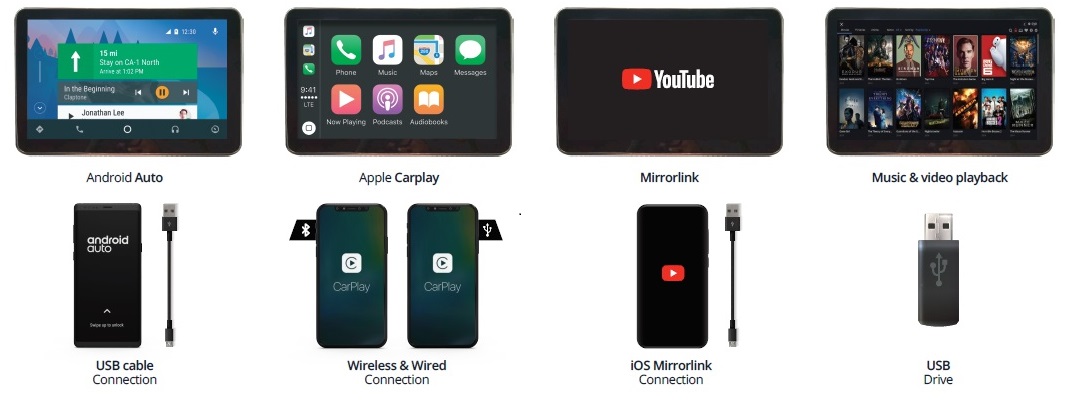
Upgrade uw Aston Martin & Mercedes met de APPplay-smartphone-interface. APPplay ondersteunt multimedia via USB, CarPlay, Android Auto en een camera op uw bestaande systeem.
U kunt apps op uw telefoon gebruiken via CarPlay & Android Auto zonder uw telefoon aan te raken. U kunt APPplay bedienen via de controller en met spraakbediening.
Voorbeeldvideo
Functies
- Ondersteuning voor de originele controller
- Ondersteuning voor de originele knoppen in de auto
- Ondersteuning voor de originele microfoon (OEM BT Carit-functie)
- Ondersteuning voor spraakbediening (Siri & Google Assistant)
- Navigatie-apps gebruiken, zoals Google Maps, TomTom & Waze
- Muziekapps afspelen, zoals Spotify, Podcast, Music
- Telefoongesprekken voeren en berichten beluisteren
- Ingang voor achteruitrijcamera
- Ingang voor frontcamera
- AV-ingang
- Ondersteuning voor MirrorLink
- Ondersteuning voor USB-media (MP3/MP4)
- Beeldweergave tijdens het rijden
- Geïntegreerde DPS-audio-equalizer
- OSD-menu voor het aanpassen van beeld- en audio-instellingen
- 3 jaar garantie
- Ondersteuning voor de originele knoppen in de auto
- Ondersteuning voor de originele microfoon (OEM BT Carit-functie)
- Ondersteuning voor spraakbediening (Siri & Google Assistant)
- Navigatie-apps gebruiken, zoals Google Maps, TomTom & Waze
- Muziekapps afspelen, zoals Spotify, Podcast, Music
- Telefoongesprekken voeren en berichten beluisteren
- Ingang voor achteruitrijcamera
- Ingang voor frontcamera
- AV-ingang
- Ondersteuning voor MirrorLink
- Ondersteuning voor USB-media (MP3/MP4)
- Beeldweergave tijdens het rijden
- Geïntegreerde DPS-audio-equalizer
- OSD-menu voor het aanpassen van beeld- en audio-instellingen
- 3 jaar garantie
EXCLUSIEVE APPplay-FUNCTIES

Functies:
- Apps gebruiken, zoals Spotify / Flitzmeister / Apple Maps / Waze / Google Maps
- Handsfree bellen en berichten versturen
- Siri-spraakbediening
- Muziek en video afspelen via USB
- Bluetooth-koppelingsoptie beschikbaar
- Draadloze CarPlay-functie via wifi
- Geïntegreerde audiobediening met equalizer
- Analoge audio-uitgang (via RCA of 3,5mm-aansluiting)
- Ondersteuning voor auto's met links- en rechts stuur
- Software-updates via USB
Waarom kiezen voor APPplay?
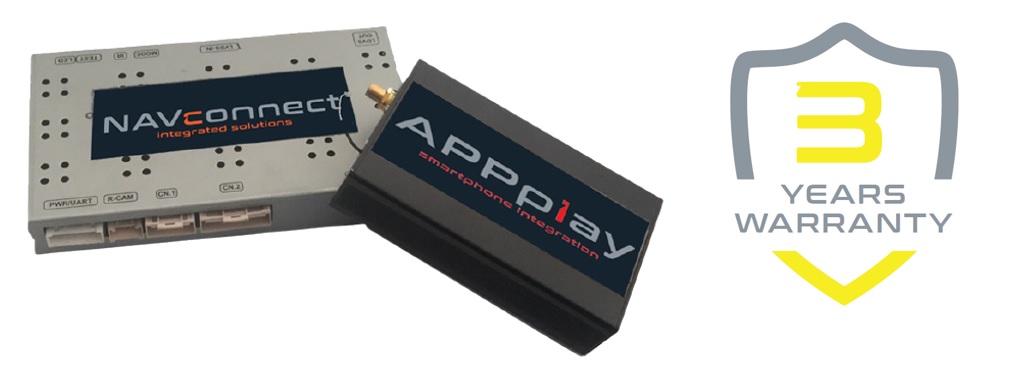
In vergelijking met onze concurrenten bestaat onze APPplay-set uit twee modules: 1* voertuigspecifieke NAVconnect-interface en 1* APPplay-interface. Zo bieden wij de meest stabiele integratieset voor CarPlay & Android Auto op de markt, met 3 jaar garantie.
EXCLUSIEVE FUNCTIES VAN DE NAVconnect-INTERFACE

Functies:
- Ondersteuning voor OEM-knoppen
- Ingang voor achteruitrijcamera (CVBS - NTSC)
- iPAS-lijnen (verplaatsbare hulplijnen)
- Ingang voor frontcamera (CVBS - NTSC)
- Vertraging instellen voor de ingang van de frontcamera (3-15sec)
- OSD-menu (om de interface-instellingen aan te passen)
NAVconnect OEM-knop
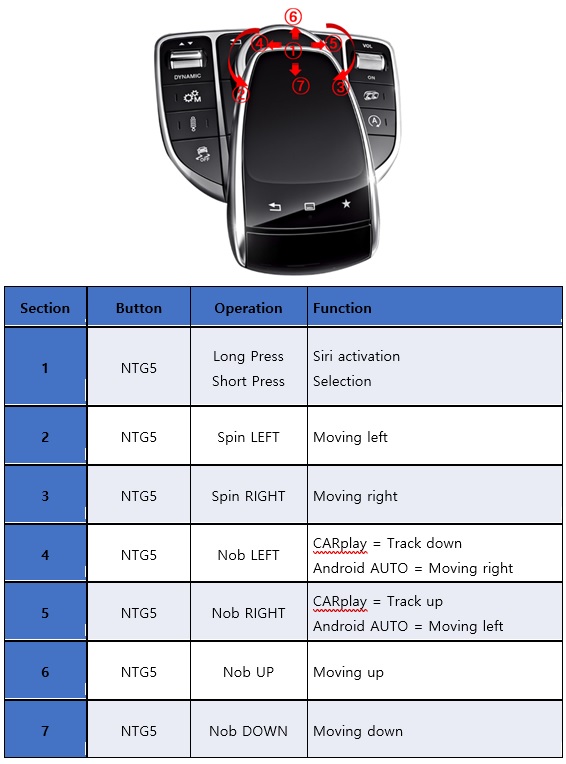
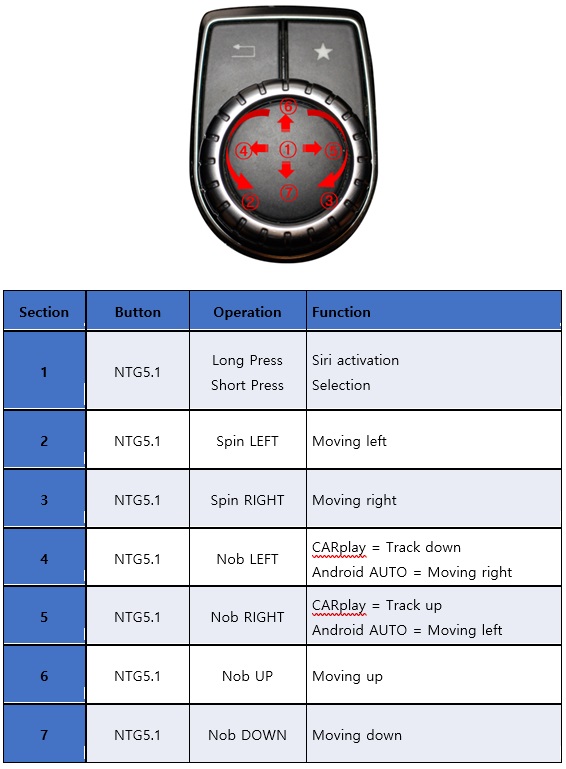
OPMERKINGEN
- De auto moet beschikken over een Aux-ingang, een optie voor Bluetooth-streaming of een USB-ingang.
- Wij raden aan de installatie door een gekwalificeerde specialist te laten uitvoeren
- Bekijk de andere tabbladen voor "Compatibiliteit" - "Inhoud van de verpakking" - "Productspecificaties"
DISCLAIMER
Apple, iPod, iPhone, iTunes, CarPlay en het CarPlay-logo zijn gedeponeerde handelsmerken van Apple Inc., geregistreerd in de VS en andere landen. Android, Android Auto, Google Maps, Waze
en Talk to Google zijn gedeponeerde handelsmerken van Google Inc.
Het woordmerk en de logo's van Bluetooth® zijn gedeponeerde handelsmerken van Bluetooth SIG, Inc.
Garantieverklaring: de NAVconnect-box heeft een garantieperiode van 3 jaar en de APPplay-box van 2 jaar.
DB11
2016-201..
- Note: iPAS option wont work when the car does not have OEM parking sensors - AUX-2USB included
- A/V input
- A/V output
- Activation
Switch & OEM - APPplay control
Oem controller - Front camera input
- Guide lines
- HDMI input
- Rear camera input
- Head-unit
AMI infotainment - Open head-unit
- Picture in Picture (PiP)
- R-gear select
Lamp & CAN
Vantage
2018-20..
- Note: iPAS option wont work when the car does not have OEM parking sensors - AUX-2USB included
- A/V input
- A/V output
- Activation
Switch & OEM - APPplay control
Oem controller - Front camera input
- Guide lines
- HDMI input
- Rear camera input
- Head-unit
AMI infotainment - Open head-unit
- Picture in Picture (PiP)
- R-gear select
Lamp & CAN
A Class (W176)
2015-04/2018
- Note: iPAS option wont work when the car does not have OEM parking sensors - AUX-2USB included
- A/V input
- A/V output
- Activation
Switch & OEM - APPplay control
Oem controller - Front camera input
- Guide lines
- HDMI input
- Rear camera input
- Head-unit
Audio 20 Garmin (7.0") & Comand (8.0"/10.2") - Open head-unit
- Picture in Picture (PiP)
- R-gear select
Lamp & CAN
B Class (W246)
2015-11/2018
- Note: iPAS option wont work when the car does not have OEM parking sensors - AUX-2USB included
- A/V input
- A/V output
- Activation
Switch & OEM - APPplay control
Oem controller - Front camera input
- Guide lines
- HDMI input
- Rear camera input
- Head-unit
Audio 20 Garmin (7.0") & Comand (8.0"/10.2") - Open head-unit
- Picture in Picture (PiP)
- R-gear select
Lamp & CAN
C Class (W205)
2014-06/2018
- Note: iPAS option wont work when the car does not have OEM parking sensors - AUX-2USB included
- A/V input
- A/V output
- Activation
Switch & OEM - APPplay control
Oem controller - Front camera input
- Guide lines
- HDMI input
- Rear camera input
- Head-unit
Audio 20 Garmin (7.0") & Comand (8.0"/10.2") - Open head-unit
- Picture in Picture (PiP)
- R-gear select
Lamp & CAN
C Class Coupe (C205)
2015-20..
- Note: iPAS option wont work when the car does not have OEM parking sensors - AUX-2USB included
- A/V input
- A/V output
- Activation
Switch & OEM - APPplay control
Oem controller - Front camera input
- Guide lines
- HDMI input
- Rear camera input
- Head-unit
Audio 20 Garmin (7.0") & Comand (8.0"/10.2") - Open head-unit
- Picture in Picture (PiP)
- R-gear select
Lamp & CAN
CLA Class
2015-02/2019
- Note: iPAS option wont work when the car does not have OEM parking sensors - AUX-2USB included
- A/V input
- A/V output
- Activation
Switch & OEM - APPplay control
Oem controller - Front camera input
- Guide lines
- HDMI input
- Rear camera input
- Head-unit
Audio 20 Garmin (7.0") & Comand (8.0"/10.2") - Open head-unit
- Picture in Picture (PiP)
- R-gear select
Lamp & CAN
CLS Class (C218)
2015-2018
- Note: iPAS option wont work when the car does not have OEM parking sensors - AUX-2USB included
- A/V input
- A/V output
- Activation
Switch & OEM - APPplay control
Oem controller - Front camera input
- Guide lines
- HDMI input
- Rear camera input
- Head-unit
Audio 20 Garmin (7.0") & Comand (8.0"/10.2") - Open head-unit
- Picture in Picture (PiP)
- R-gear select
Lamp & CAN
CLS Class Shooting
08/2014-2019
- Note: iPAS option wont work when the car does not have OEM parking sensors - AUX-2USB included
- A/V input
- A/V output
- Activation
Switch & OEM - APPplay control
Oem controller - Front camera input
- Guide lines
- HDMI input
- Rear camera input
- Head-unit
Audio 20 Garmin (7.0") & Comand (8.0"/10.2") - Open head-unit
- Picture in Picture (PiP)
- R-gear select
Lamp & CAN
E Class (C207 Coupe)
11/2014-2016
- Note: iPAS option wont work when the car does not have OEM parking sensors - AUX-2USB included
- A/V input
- A/V output
- Activation
Switch & OEM - APPplay control
Oem controller - Front camera input
- Guide lines
- HDMI input
- Rear camera input
- Head-unit
Audio 20 Garmin (7.0") & Comand (8.0"/10.2") - Open head-unit
- Picture in Picture (PiP)
- R-gear select
Lamp & CAN
E Class (W212)
11/2014-08/2017
- Note: iPAS option wont work when the car does not have OEM parking sensors - AUX-2USB included
- A/V input
- A/V output
- Activation
Switch & OEM - APPplay control
Oem controller - Front camera input
- Guide lines
- HDMI input
- Rear camera input
- Head-unit
Audio 20 Garmin (7.0") & Comand (8.0"/10.2") - Open head-unit
- Picture in Picture (PiP)
- R-gear select
Lamp & CAN
GLA Class
2015-20..
- Note: iPAS option wont work when the car does not have OEM parking sensors - AUX-2USB included
- A/V input
- A/V output
- Activation
Switch & OEM - APPplay control
Oem controller - Front camera input
- Guide lines
- HDMI input
- Rear camera input
- Head-unit
Audio 20 Garmin (7.0") & Comand (8.0"/10.2") - Open head-unit
- Picture in Picture (PiP)
- R-gear select
Lamp & CAN
GLC Class
2015-2019
- Note: iPAS option wont work when the car does not have OEM parking sensors - AUX-2USB included
- A/V input
- A/V output
- Activation
Switch & OEM - APPplay control
Oem controller - Front camera input
- Guide lines
- HDMI input
- Rear camera input
- Head-unit
Audio 20 Garmin (7.0") & Comand (8.0"/10.2") - Open head-unit
- Picture in Picture (PiP)
- R-gear select
Lamp & CAN
GLE Class (W166)
2015-2018
- Note: iPAS option wont work when the car does not have OEM parking sensors - AUX-2USB included
- A/V input
- A/V output
- Activation
Switch & OEM - APPplay control
Oem controller - Front camera input
- Guide lines
- HDMI input
- Rear camera input
- Head-unit
Audio 20 Garmin (7.0") & Comand (8.0"/10.2") - Open head-unit
- Picture in Picture (PiP)
- R-gear select
Lamp & CAN
GLE Class (W166)
2018-20..
- Note: iPAS option wont work when the car does not have OEM parking sensors - AUX-2USB included
- A/V input
- A/V output
- Activation
Switch & OEM - APPplay control
Oem controller - Front camera input
- Guide lines
- HDMI input
- Rear camera input
- Head-unit
Audio 20 Garmin (7.0") & Comand (8.0"/10.2") - Open head-unit
- Picture in Picture (PiP)
- R-gear select
Lamp & CAN
GLK Class (X204)
2015-2018
- Note: iPAS option wont work when the car does not have OEM parking sensors - AUX-2USB included
- A/V input
- A/V output
- Activation
Switch & OEM - APPplay control
Oem controller - Front camera input
- Guide lines
- HDMI input
- Rear camera input
- Head-unit
Audio 20 Garmin (7.0") & Comand (8.0"/10.2") - Open head-unit
- Picture in Picture (PiP)
- R-gear select
Lamp & CAN
GLS Class (X166)
2015-2018
- Note: iPAS option wont work when the car does not have OEM parking sensors - AUX-2USB included
- A/V input
- A/V output
- Activation
Switch & OEM - APPplay control
Oem controller - Front camera input
- Guide lines
- HDMI input
- Rear camera input
- Head-unit
Audio 20 Garmin (7.0") & Comand (8.0"/10.2") - Open head-unit
- Picture in Picture (PiP)
- R-gear select
Lamp & CAN
GT Class (C190)
2015-2018
- Note: iPAS option wont work when the car does not have OEM parking sensors - AUX-2USB included
- A/V input
- A/V output
- Activation
Switch & OEM - APPplay control
Oem controller - Front camera input
- Guide lines
- HDMI input
- Rear camera input
- Head-unit
Audio 20 Garmin (7.0") & Comand (8.0"/10.2") - Open head-unit
- Picture in Picture (PiP)
- R-gear select
Lamp & CAN
S Class (W222)
2013-2017
- Note: iPAS option wont work when the car does not have OEM parking sensors - AUX-2USB included
- A/V input
- A/V output
- Activation
Switch & OEM - APPplay control
Oem controller - Front camera input
- Guide lines
- HDMI input
- Rear camera input
- Head-unit
Audio 20 Garmin (7.0") & Comand (8.0"/10.2") - Open head-unit
- Picture in Picture (PiP)
- R-gear select
Lamp & CAN
S Class Coupe (C217)
2013-2017.
- Note: iPAS option wont work when the car does not have OEM parking sensors - AUX-2USB included
- A/V input
- A/V output
- Activation
Switch & OEM - APPplay control
Oem controller - Front camera input
- Guide lines
- HDMI input
- Rear camera input
- Head-unit
Audio 20 Garmin (7.0") & Comand (8.0"/10.2") - Open head-unit
- Picture in Picture (PiP)
- R-gear select
Lamp & CAN
SL Class Coupe (R231)
10/2015-20..
- Note: iPAS option wont work when the car does not have OEM parking sensors - AUX-2USB included
- A/V input
- A/V output
- Activation
Switch & OEM - APPplay control
Oem controller - Front camera input
- Guide lines
- HDMI input
- Rear camera input
- Head-unit
Audio 20 Garmin (7.0") & Comand (8.0"/10.2") - Open head-unit
- Picture in Picture (PiP)
- R-gear select
Lamp & CAN
V Class (W447)
2014-20..
- Note: iPAS option wont work when the car does not have OEM parking sensors - AUX-2USB included
- A/V input
- A/V output
- Activation
Switch & OEM - APPplay control
Oem controller - Front camera input
- Guide lines
- HDMI input
- Rear camera input
- Head-unit
Audio 20 Garmin (7.0") & Comand (8.0"/10.2") - Open head-unit
- Picture in Picture (PiP)
- R-gear select
Lamp & CAN
X Class (BR470)
11/2017-20..
- Note: iPAS option wont work when the car does not have OEM parking sensors - AUX-2USB included
- A/V input
- A/V output
- Activation
Switch & OEM - APPplay control
Oem controller - Front camera input
- Guide lines
- HDMI input
- Rear camera input
- Head-unit
Audio 20 Garmin (7.0") & Comand (8.0"/10.2") - Open head-unit
- Picture in Picture (PiP)
- R-gear select
Lamp & CAN

OPMERKINGEN
-Android-telefoons hebben doorgaans 2 verschillende instellingen voor het opladen van de batterij: geoptimaliseerd en snel. APPplay ondersteunt GEEN snelladen. Om Android AUTO te gebruiken zonder dat de batterij leegloopt, raden wij aan een draadloze oplaadpad te gebruiken.
-De audio-uitgang van de APPplay moet worden aangesloten op de mediabron van de auto, bijvoorbeeld via de AUX-ingang, AMI-ingang of USB (AUX2USB-adapter), zodat u het geluid van de APPplay-module via de autospeakers kunt horen.
-Voor de installatie van dit product is geen codering nodig.
-De installatie van dit product maakt de garantie van de auto niet ongeldig.
VEREISTEN
|
Deze kit bevat een AUX2USB-adapter voor audio-invoer via de originele USB-ingang |
|
|
VIDEO-UITGANG |
Video wordt via LVDS weergegeven |
|
BEDIENING |
U kunt CARplay en Android AUTO bedienen via de originele Comand-controller |
|
SCHERM |
De interface is compatibel met 7.0”, 8.0”, 8.4”, 12.4 en 12.4” DUAL |
|
OPEN HU |
De monitor hoeft niet geopend te worden |
|
FRONTCAMERA |
De ingang voor de frontcamera wordt automatisch ingeschakeld zodra u de achteruitversnelling verlaat. U kunt de weergavetijd in seconden instellen via het OSD-menu (1-15 sec). Het is ook mogelijk om de ingang voor de frontcamera handmatig te selecteren |
|
ORIGINELE ACHTERUITRIJCAMERA |
De interface schakelt automatisch terug naar de ingang van de originele achteruitrijcamera wanneer de achteruitversnelling wordt ingeschakeld (bij een automatische versnellingsbak). |
|
RICHTLIJNEN |
Statische lijnen en iPAS-lijnen zijn beschikbaar via het OSD-menu van de interface |
|
iPAS |
De iPAS-optie is beschikbaar wanneer de auto is uitgerust met de originele PDC-optie (beweegbare rasterlijnen) |
|
PIP |
De PiP-optie is beschikbaar voor de weergave van de originele parkeersensoren (Picture in Picture) |
|
INGANG ACHTERUITRIJCAMERA SELECTEREN |
Bij auto's met een automatische versnellingsbak reageert de interface op CAN. Gebruik bij een handgeschakelde versnellingsbak de detectiedraad voor de achteruitversnelling. |
|
INSTALLATIE |
Wij raden aan de installatie door een gekwalificeerde specialist te laten uitvoeren |
|
EXTRA OPMERKING |
De interface schakelt alleen automatisch naar de 360-camera wanneer de achteruitversnelling wordt ingeschakeld. In alle andere versnellingen moet u dit handmatig doen. Mercedes SLC (R172) is niet compatibel |
MEDIASPELER
De mediaspeler ondersteunt de volgende bestanden:
|
MUZIEK |
MP3 |
|
VIDEO |
MP4 |
MEDIASPELER
De mediaspeler ondersteunt de volgende bestanden:
|
MUZIEK |
MP3 |
|
VIDEO |
MP4 |
ANDROID AUTO
Uw telefoon moet compatibel zijn met Android AUTO en de Android Auto-app moet beschikbaar zijn in uw land.
Een Android-telefoon met Android 5.0 (Lollipop) of hoger en een data-abonnement. Voor de beste prestaties raden wij Android 6.0 (Marshmallow) of hoger aan. U kunt de softwareversie van uw telefoon controleren onder 'Over dit apparaat' in de instellingen
Raadpleeg de volgende link voor meer informatie over Android Auto:
Apps die u met Android Auto kunt gebruiken:
Als uw land niet wordt ondersteund (de app is niet beschikbaar in de Google Play Store), raadpleeg dan de volgende link voor informatie over het downloaden van de app:
APPLE CARPLAY
Uw telefoon moet compatibel zijn met Apple Carplay.
Raadpleeg de volgende link voor meer informatie over Apple Carplay:
Gerelateerde producten

Start een gesprek
Hallo! Klik hieronder op een van onze medewerkers om via WhatsApp te chatten.
- Het team reageert doorgaans binnen enkele minuten.
- HeesterbeekEdwinOnline