We use cookies to make your experience better. To comply with the new e-Privacy directive, we need to ask for your consent to set the cookies. Learn more.


SKU:CP-BMW-CIC
APPplay_CARplay & Android Auto-set voor BMW/MINI iDrive CIC & CIC2 Business (CVBS)

BESCHRIJVING
Algemeen
Upgrade uw BMW of Mini met CARPLAY & ANDROID Auto voor uw bestaande systeem. U kunt apps vanaf uw iPhone gebruiken via CarPlay & Android Auto zonder uw iPhone aan te raken. U kunt deze CarPlay-kit bedienen via de iDrive-controller en met spraakbediening (Siri).
Voorbeeldvideo
Functies
- Bediening via de iDrive-controller
- Bediening met spraak (Siri & Google Assistant)
- Navigatie-apps gebruiken, zoals Google Maps, TomTom & Waze
- Muziekapps afspelen, zoals Spotify, Podcast, Music
- Telefoneren en naar uw berichten luisteren
- Ingang voor achteruitrijcamera
- Ingang voor frontcamera
- AV-ingang
- Ondersteuning van originele knoppen
- Beeld tijdens het rijden
- 2 jaar garantie & ondersteuning

EXCLUSIEVE CARPLAY & ANDROID AUTO-FUNCTIES
Navigatie met de Apple Maps / Waze GPS-app
Gratis stapsgewijze navigatie met rijstrookbegeleiding, actuele verkeersinformatie, nuttige plaatsen en meer
Handsfree bellen en berichten versturen
Bel en verstuur berichten zonder uw handen van het stuur te halen, via Telefoon en iMessage
Informatie en hulp
Ontvang weer-, verkeers- en woon-werkverkeerinformatie en meer, overzichtelijk weergegeven op eenvoudige kaarten
Neem uw muziek mee
Luister in de auto naar uw muziek en afspeellijsten via het ingebouwde stereosysteem
Draadloze CARplay (optioneel)
Draadloze CARplay is als optie beschikbaar.
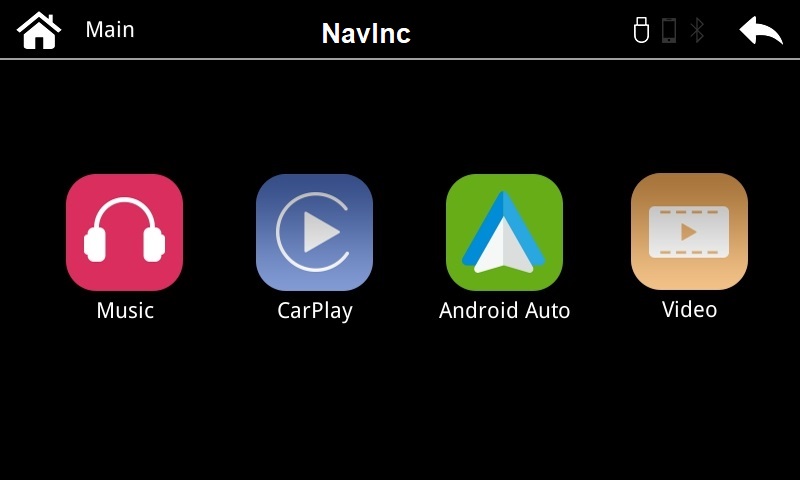
EXCLUSIEVE INTERFACEFUNCTIES
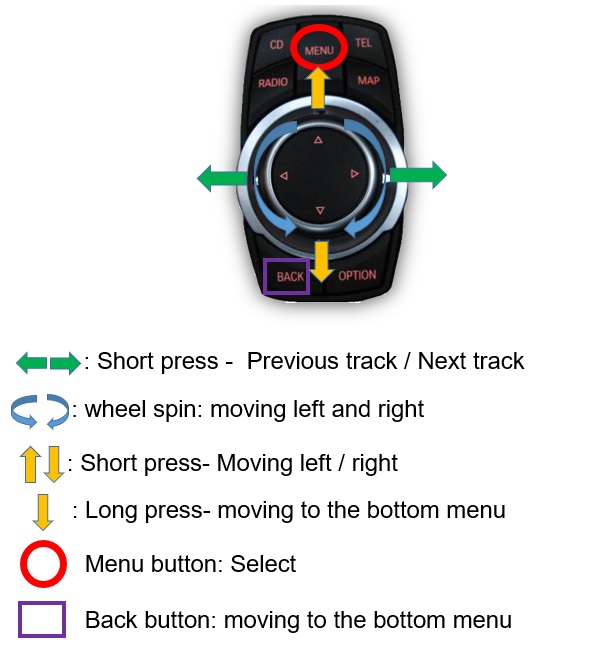
iDrive-bediening
Houd de knop “MENU” op de iDrive ingedrukt om het CarPlay-menu te openen.
Met de iDrive-controller kunt u de app selecteren of Siri activeren.
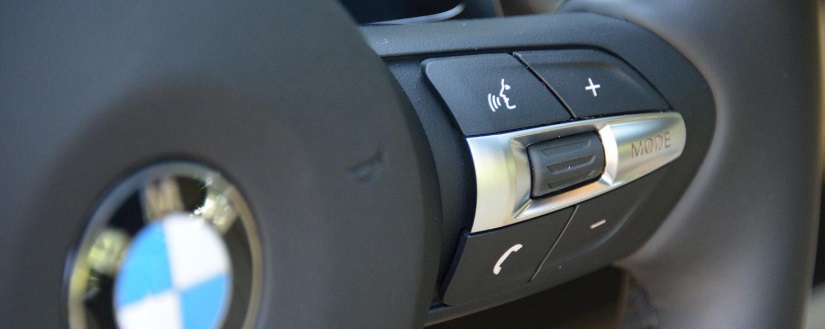
Bediening via het stuurwiel
Houd de knop “VOICE” op het stuurwiel ingedrukt om het CarPlay-menu te openen en gebruik de volumeknoppen om het volume in te stellen.
Siri-spraakbediening
Nadat u naar het CarPlay-menu bent overgeschakeld, kunt u Siri-spraakbediening gebruiken om te bellen, naar muziek en spraakberichten te luisteren, te navigeren, berichten te beantwoorden enz.
Ingang voor achteruitrijcamera
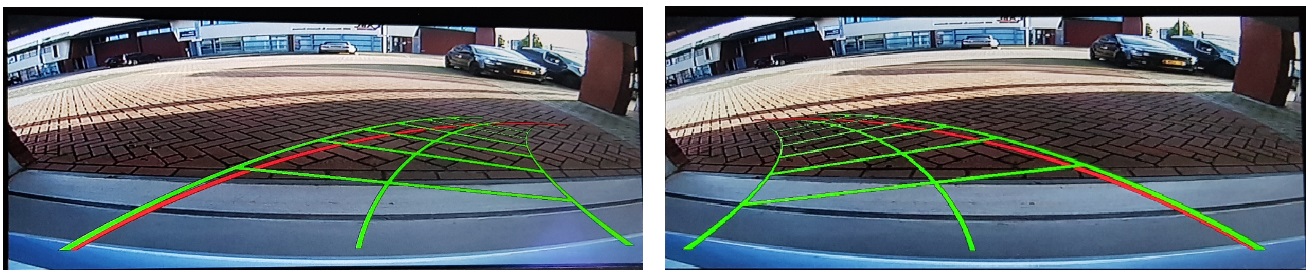
De interface ondersteunt de ingang voor originele en aftermarket-achteruitrijcamera's. Inclusief weergave van originele parkeersensorinformatie, gesplitst scherm en schermvullende modus.
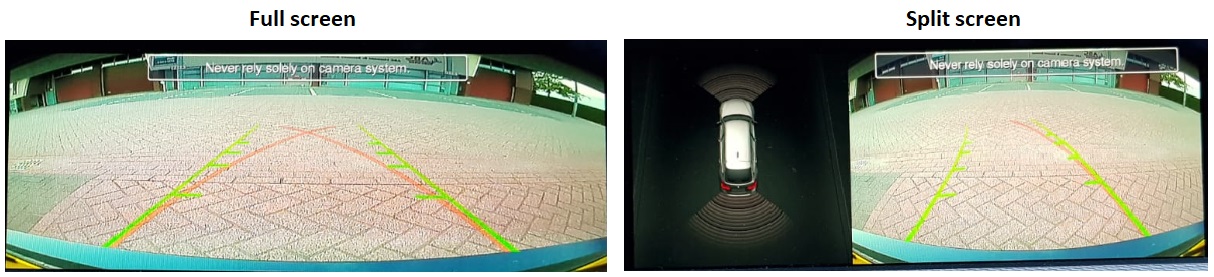
Intelligent Park Assist System (IPAS)
De interface heeft een ingebouwde functie voor intelligente parkeerrichtlijnen voor de aftermarket-camera.
AV-ingang
De interface ondersteunt de ingang voor originele en aftermarket-achteruitrijcamera's. Inclusief weergave van originele parkeersensorinformatie, gesplitst scherm en schermvullende modus.
Ingang voor frontcamera
Ingang voor frontcamera die wordt geselecteerd nadat u de achteruitversnelling hebt verlaten.
Via het OSD-menu kunt u de weergaveduur selecteren:
3 sec
5 sec
10 sec
15 sec
OPMERKINGEN
- Een Aux-in-aansluiting is noodzakelijk
- We raden aan de installatie te laten uitvoeren door een gekwalificeerde specialist
- Raadpleeg de andere tabbladen voor "Compatibiliteit" - "Inhoud van de verpakking" - "Productspecificaties"
DISCLAIMER
Apple, iPod, iPhone, iTunes, CarPlay en het CarPlay-logo zijn gedeponeerde handelsmerken van Apple Inc., geregistreerd in de Verenigde Staten en andere landen. Android, Android Auto, Google Maps, Waze
en Talk to Google zijn gedeponeerde handelsmerken van Google Inc.
Het Bluetooth®-woordmerk en de logo's zijn gedeponeerde handelsmerken van Bluetooth SIG, Inc.
1 serie (E81 E82 E87 E88)
2009-2011
- Note: PIP function only supported by iDrive Professional - CAN rear select only with auto gearbox - use CAN interface when manual gear box
- A/V input
- A/V output
- Activation
Switch & OEM - APPplay control
iDrive Controller - Front camera input
- Guide lines
- HDMI input
- Rear camera input
- Head-unit
iDrive CIC Business (6.5") - Open head-unit
- Picture in Picture (PiP)
- R-gear select
Lamp & CAN
3 serie (E90 E91 E92 E93)
2009-2011
- Note: PIP function only supported by iDrive Professional - CAN rear select only with auto gearbox - use CAN interface when manual gear box
- A/V input
- A/V output
- Activation
Switch & OEM - APPplay control
iDrive Controller - Front camera input
- Guide lines
- HDMI input
- Rear camera input
- Head-unit
iDrive CIC Business (6.5") - Open head-unit
- Picture in Picture (PiP)
- R-gear select
Lamp & CAN
5 serie (E60 E61)
2009-2010
- Note: PIP function only supported by iDrive Professional - CAN rear select only with auto gearbox - use CAN interface when manual gear box
- A/V input
- A/V output
- Activation
Switch & OEM - APPplay control
iDrive Controller - Front camera input
- Guide lines
- HDMI input
- Rear camera input
- Head-unit
iDrive CIC Business (6.5") - Open head-unit
- Picture in Picture (PiP)
- R-gear select
Lamp & CAN
5 serie (F10 F11)
2009-2012
- Note: PIP function only supported by iDrive Professional - CAN rear select only with auto gearbox - use CAN interface when manual gear box
- A/V input
- A/V output
- Activation
Switch & OEM - APPplay control
iDrive Controller - Front camera input
- Guide lines
- HDMI input
- Rear camera input
- Head-unit
iDrive CIC Business (6.5") - Open head-unit
- Picture in Picture (PiP)
- R-gear select
Lamp & CAN
5 serie GT (F07)
2009-2012
- Note: PIP function only supported by iDrive Professional - CAN rear select only with auto gearbox - use CAN interface when manual gear box
- A/V input
- A/V output
- Activation
Switch & OEM - APPplay control
iDrive Controller - Front camera input
- Guide lines
- HDMI input
- Rear camera input
- Head-unit
iDrive CIC Business (6.5") - Open head-unit
- Picture in Picture (PiP)
- R-gear select
Lamp & CAN
6 serie (E63)
2009-2011
- Note: PIP function only supported by iDrive Professional - CAN rear select only with auto gearbox - use CAN interface when manual gear box
- A/V input
- A/V output
- Activation
Switch & OEM - APPplay control
iDrive Controller - Front camera input
- Guide lines
- HDMI input
- Rear camera input
- Head-unit
iDrive CIC Business (6.5") - Open head-unit
- Picture in Picture (PiP)
- R-gear select
Lamp & CAN
6 serie (F12 F13)
2011-2012
- Note: PIP function only supported by iDrive Professional - CAN rear select only with auto gearbox - use CAN interface when manual gear box
- A/V input
- A/V output
- Activation
Switch & OEM - APPplay control
iDrive Controller - Front camera input
- Guide lines
- HDMI input
- Rear camera input
- Head-unit
iDrive CIC Business (6.5") - Open head-unit
- Picture in Picture (PiP)
- R-gear select
Lamp & CAN
7-serie (F01 F02)
2009-2012
- Note: PIP function only supported by iDrive Professional - CAN rear select only with auto gearbox - use CAN interface when manual gear box
- A/V input
- A/V output
- Activation
Switch & OEM - APPplay control
iDrive Controller - Front camera input
- Guide lines
- HDMI input
- Rear camera input
- Head-unit
iDrive CIC Business (6.5") - Open head-unit
- Picture in Picture (PiP)
- R-gear select
Lamp & CAN
X1 serie (E84)
2009-2014
- Note: PIP function only supported by iDrive Professional - CAN rear select only with auto gearbox - use CAN interface when manual gear box
- A/V input
- A/V output
- Activation
Switch & OEM - APPplay control
iDrive Controller - Front camera input
- Guide lines
- HDMI input
- Rear camera input
- Head-unit
iDrive CIC Business (6.5") - Open head-unit
- Picture in Picture (PiP)
- R-gear select
Lamp & CAN
X3-serie (F25)
2010-2012
- Note: PIP function only supported by iDrive Professional - CAN rear select only with auto gearbox - use CAN interface when manual gear box
- A/V input
- A/V output
- Activation
Switch & OEM - APPplay control
iDrive Controller - Front camera input
- Guide lines
- HDMI input
- Rear camera input
- Head-unit
iDrive CIC Business (6.5") - Open head-unit
- Picture in Picture (PiP)
- R-gear select
Lamp & CAN
X5 serie (E70)
2009-2013
- Note: PIP function only supported by iDrive Professional - CAN rear select only with auto gearbox - use CAN interface when manual gear box
- A/V input
- A/V output
- Activation
Switch & OEM - APPplay control
iDrive Controller - Front camera input
- Guide lines
- HDMI input
- Rear camera input
- Head-unit
iDrive CIC Business (6.5") - Open head-unit
- Picture in Picture (PiP)
- R-gear select
Lamp & CAN
X6 serie (X70)
2009-2015
- Note: PIP function only supported by iDrive Professional - CAN rear select only with auto gearbox - use CAN interface when manual gear box
- A/V input
- A/V output
- Activation
Switch & OEM - APPplay control
iDrive Controller - Front camera input
- Guide lines
- HDMI input
- Rear camera input
- Head-unit
iDrive CIC Business (6.5") - Open head-unit
- Picture in Picture (PiP)
- R-gear select
Lamp & CAN
Z4 serie (E89)
2009-20..
- Note: PIP function only supported by iDrive Professional - CAN rear select only with auto gearbox - use CAN interface when manual gear box
- A/V input
- A/V output
- Activation
Switch & OEM - APPplay control
iDrive Controller - Front camera input
- Guide lines
- HDMI input
- Rear camera input
- Head-unit
iDrive CIC Business (6.5") - Open head-unit
- Picture in Picture (PiP)
- R-gear select
Lamp & CAN
COMPATIBILITEIT
AUTO
Deze kit is compatibel met de volgende modellen:
BMW
| 1-serie (E81/E82/E87/E88) | 2009-2011 | iDrive CIC Business(6.5") |
| 3-serie (E90/E91/E92/E93) | 2009-2011 | iDrive CIC Professional (8.8" & 10.25") |
| 5-serie (E60/E61) | 2009-2010 | iDrive CIC Professional (8.8" & 10.25") |
| 5-serie (F10/F11) | 2009-2012 | iDrive CIC Professional (8.8" & 10.25") |
| 5-serie GT (F07) | 2009-2012 | iDrive CIC Professional (8.8" & 10.25") |
| 6-serie (E63) | 2009-2011 | iDrive CIC Professional (8.8" & 10.25") |
| 6-serie (F12/F13/F14) | 2011-2012 | iDrive CIC Professional (8.8" & 10.25") |
| 7-serie (F01/F02) | 2009-2012 | iDrive CIC Professional (8.8" & 10.25") |
| X1-serie (E84) | 2009-2014 | iDrive CIC Professional (8.8" & 10.25") |
| X3-serie (F25) | 2010-2012 | iDrive CIC Professional (8.8" & 10.25") |
| X5-serie (E70) | 2009-2013 | iDrive CIC Professional (8.8" & 10.25") |
| X6-serie (E71) | 2009-2015 | iDrive CIC Professional (8.8" & 10.25") |
| Z4-serie (E89) | 2009-20.. | iDrive CIC Professional (8.8" & 10.25") |
MINI
| Cabrio (R57) | 2009-2016 | iDrive CIC Professional (8.8") |
| Clubman (R55) | 2010-2015 | iDrive CIC Professional (8.8") |
| Countryman (R60) | 2010-2014 | iDrive CIC Professional (8.8") |
| Coupe | 2011-2015 | iDrive CIC Professional (8.8") |
| One | 2011-2014 | iDrive CIC Professional (8.8") |
| Paceman | 2013-2014 | iDrive CIC Professional (8.8") |
| Roadster | 2012-2015 | iDrive CIC Professional (8.8") |
Rolce Royce
| Ghost | 2010-2013 | iDrive CIC Professional (8.8" & 10.25") |
| Phantom | 2010-2013 | iDrive CIC Professional (8.8" & 10.25") |
| Phantom Coupe | 2010-2013 | iDrive CIC Professional (8.8" & 10.25") |
| Phantom Drophead | 2009-2013 | iDrive CIC Professional (8.8" & 10.25") |
VEREISTEN
|
AUDIO-UITGANG |
De interface voegt ALLEEN videosignalen toe aan het infotainmentsysteem. Een Aux-in-aansluiting is essentieel wanneer u audio van de CARplay-box gebruikt |
|
VIDEO-UITGANG |
Video wordt via LVDS verzonden |
|
BEDIENING |
U kunt CarPlay & Android Auto bedienen via de iDrive-controller |
|
SCHERM |
Compatibel met 6.5”, 8.8” & 10.2” |
|
HU OPENEN |
De monitor hoeft niet te worden geopend |
|
CAMERA VOORZIJDE |
De ingang voor de camera aan de voorzijde wordt automatisch geactiveerd zodra u de achteruitversnelling uitschakelt. U kunt de weergaveduur in seconden instellen via het OSD-menu (1-15 sec). U kunt de ingang voor de camera aan de voorzijde ook handmatig selecteren |
|
OEM-ACHTERUITRIJCAMERA |
De interface schakelt automatisch terug naar de ingang van de OEM-achteruitrijcamera wanneer de achteruitversnelling wordt ingeschakeld. |
|
HULPLIJNEN |
Statische hulplijnen zijn beschikbaar via het OSD-menu van de interface |
|
iPAS |
De iPAS-optie is beschikbaar (verplaatsbare hulplijnen) |
|
PIP |
De PiP-optie (gesplitst scherm) is beschikbaar (Picture in Picture) |
|
INGANG ACHTERUITRIJCAMERA SELECTEREN |
De interface reageert op CAN bij auto's met een automatische versnellingsbak. Gebruik bij een handgeschakelde versnellingsbak de detectiedraad voor de achteruitversnelling. |
|
INSTALLATIE |
We raden aan de installatie door een gekwalificeerde specialist te laten uitvoeren |
MEDIASPELER
De mediaspeler ondersteunt de volgende bestanden:
|
MUZIEK |
MP3 |
|
VIDEO |
MP4 |
MEDIASPELER
De mediaspeler ondersteunt de volgende bestanden:
|
MUZIEK |
MP3 |
|
VIDEO |
MP4 |
ANDROID AUTO
Uw telefoon moet compatibel zijn met Android Auto en de Android Auto-app moet beschikbaar zijn in uw land.
Een Android-telefoon met Android 5.0 (Lollipop) of hoger en een data-abonnement. Voor de beste prestaties raden we Android 6.0 (Marshmallow) of hoger aan. U kunt de softwareversie van uw telefoon controleren in het gedeelte Over dit apparaat onder Instellingen
Raadpleeg de volgende link voor meer informatie over Android Auto:
Apps die u kunt gebruiken met Android Auto:
Als uw land niet wordt ondersteund (de app is niet beschikbaar in Google Playstore), raadpleegt u de volgende link voor informatie over het downloaden van de app:
APPLE CARPLAY
Uw telefoon moet compatibel zijn met Apple CarPlay.
Raadpleeg de volgende link voor meer informatie over Apple CarPlay:
INHOUD VAN DE VERPAKKING
Meegeleverd in de set:
CP-UNI-CVBS
Pakket:
-
CarPlay-interface 1x
-
Voedingskabel: 1x
-
AUX-kabel, jack naar RCA: 1x
-
Microfoon: 1x
-
USB-dockkabel: 1x
-
Installatie-instructies: 1x
Pakket:
Gerelateerde producten


Start een gesprek
Hallo! Klik hieronder op een van onze medewerkers om via WhatsApp te chatten.
- Het team reageert doorgaans binnen enkele minuten.
- HeesterbeekEdwinOnline