We gebruiken cookies om uw ervaring te verbeteren. Om te voldoen aan de nieuwe e-Privacyrichtlijn moeten wij u om toestemming vragen voor het plaatsen van cookies. Meer informatie.


SKU:IF-MB-NTG5PHV
Multimedia HDMI-interface voor MB Comand NTG5 incl. iPAS
Algemeen
Met de NavInc-interfaces kunt u videobronnen aansluiten op de originele Mercedes Comand NTG5-systemen.
Functies
# RGB-ingang (voor het aansluiten van een extern navigatiesysteem)
# 2x audio-/video-ingang (voor het aansluiten van videobronnen zoals DVB-T / DVD / iPod)
# 1x HDMI-ingang (voor het aansluiten van HDMI-bronnen zoals Mirrorlink / Apple TV / Chromecast)
# Camera-ingang (voor het aansluiten van een achteruitrijcamera)
# Ingang voor frontcamera (automatische omschakeling)
# Video-uitgang (voor het aansluiten van schermen in de hoofdsteunen)
# NTSC-ondersteuning
# Audio-uitgang (audioverbinding met het originele audiosysteem)
# Beeldweergave tijdens het rijden
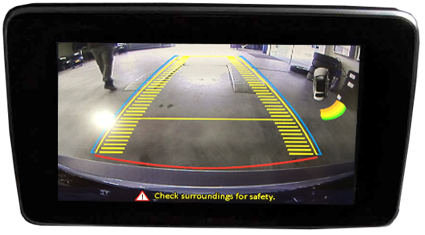
# Verstelbare parkeerlijnen
# Video-uitgang (voor het aansluiten van schermen in de hoofdsteunen)
# NTSC-ondersteuning
# Audio-uitgang (audioverbinding met het originele audiosysteem)
# Beeldweergave tijdens het rijden
# Verstelbare parkeerlijnen
# iPAS-functie (intelligent Park Assist System)
# Gesplitst scherm (camera en OEM-parkeersensoren)
# Ondersteuning voor touchscreen (voor extern touchscreen)
# Ondersteuning voor touchscreen (voor extern touchscreen)
Activering
Schakel het videobeeld om via de originele bedieningselementen van de auto.
Touchpad
HOME-knop kort indrukken: terug naar OEM
RETURN-knop kort indrukken: terug naar OEM
RETURN-knop lang indrukken: schakelen tussen RGB-HDMI-AV1-AV2-OEM

Comand
NAVI-knop kort indrukken: terug naar OEM
NAVI-knop kort indrukken: terug naar OEM
NAVI-knop lang indrukken: schakelen tussen RGB-HDMI-AV1-AV2-OEM
Stuurwiel
RETURN-knop kort indrukken: terug naar OEM
RETURN-knop lang indrukken: schakelen tussen RGB-HDMI-AV1-AV2-OEM
RETURN-knop kort indrukken: terug naar OEM
RETURN-knop lang indrukken: schakelen tussen RGB-HDMI-AV1-AV2-OEM

OSD-menu
Via het interfacemenu kunnen diverse instellingen worden aangepast voor een zo optimaal mogelijk beeld, namelijk;
Tint
Helderheid
Contrast
Scherpte
Parkeerhulp
- PDC-weergave; parkeerafstandcontrole (radar)
- Flexibele dynamische parkeerlijnen; deze bewegen mee wanneer u aan het stuurwiel draait (iPAS)
- Beeld-in-beeld; toont de PDC-weergave en het beeld van de achteruitrijcamera op één scherm (PIP)
Bediening van het apparaat
U kunt de OEM Comand-controller gebruiken om de externe AV-bron te bedienen.
Aanvullende informatie:
- Controleer onder het tabblad “compatibility” bovenaan deze pagina of uw radio- of navigatiesysteem geschikt is voor dit product.
- De audio van de aangesloten videobron moet worden aangesloten op de AUX-ingang van de auto, een FM-modulator, USB of iPod-interface.
- Er is geen constante spanning (+30) nodig, waardoor de interface veel stabieler is.
- De audio van de aangesloten videobron moet worden aangesloten op de AUX-ingang van de auto, een FM-modulator, USB of iPod-interface.
- Er is geen constante spanning (+30) nodig, waardoor de interface veel stabieler is.
- De functie ”Mute” is beschikbaar voor de video-ingangen die niet worden gebruikt.
- Metalen behuizing en nieuwe componenten (geen Chinese of gereviseerde componenten).
- Metalen behuizing en nieuwe componenten (geen Chinese of gereviseerde componenten).
A Class (W176)
2015-04/2018
- Opmerking: *iPAS option wont work when the car does not have OEM parking sensors.
- Open head-unit
- Head-unit
Audio 20 Garmin (7.0") & Comand (8.0"/10.2") - Touch support
Glass - R-gear select
Lamp & CAN - iPAS lines
- Picture in Picture (PiP)
- I-DRV
- Guide lines
- CVBS signal
NTSC - Rear camera input
- Signal
LVDS - Activation
Switch & OEM - A/V output
- A/V input
- HDMI input
- LVDS input
- RGB input
- Front camera input
B Class (W246)
2015-11/2018
- Opmerking: *iPAS option wont work when the car does not have OEM parking sensors.
- Open head-unit
- Head-unit
Audio 20 Garmin (7.0") & Comand (8.0"/10.2") - Touch support
Glass - R-gear select
Lamp & CAN - iPAS lines
- Picture in Picture (PiP)
- I-DRV
- Guide lines
- CVBS signal
NTSC - Rear camera input
- Signal
LVDS - Activation
Switch & OEM - A/V output
- A/V input
- HDMI input
- LVDS input
- RGB input
- Front camera input
C Class (W205)
2014-06/2018
- Opmerking: Touchpad support (TS-CON-MB) / *iPAS option wont work when the car does not have OEM parking sensors.
- Open head-unit
- Head-unit
Audio 20 Garmin (7.0") & Comand (8.0"/10.2") - Touch support
Glass - R-gear select
Lamp & CAN - iPAS lines
- Picture in Picture (PiP)
- I-DRV
- Guide lines
- CVBS signal
NTSC - Rear camera input
- Signal
LVDS - Activation
Switch & OEM - A/V output
- A/V input
- HDMI input
- LVDS input
- RGB input
- Front camera input
C Class Coupe (C205)
2015-20..
- Opmerking: *iPAS option wont work when the car does not have OEM parking sensors.
- Open head-unit
- Head-unit
Audio 20 Garmin (7.0") & Comand (8.0"/10.2") - Touch support
Glass - R-gear select
Lamp & CAN - iPAS lines
- Picture in Picture (PiP)
- I-DRV
- Guide lines
- CVBS signal
NTSC - Rear camera input
- Signal
LVDS - Activation
Switch & OEM - A/V output
- A/V input
- HDMI input
- LVDS input
- RGB input
- Front camera input
CLA Class
2015-02/2019
- Opmerking: *iPAS option wont work when the car does not have OEM parking sensors.
- Open head-unit
- Head-unit
Audio 20 Garmin (7.0") & Comand (8.0"/10.2") - Touch support
Glass - R-gear select
Lamp & CAN - iPAS lines
- Picture in Picture (PiP)
- I-DRV
- Guide lines
- CVBS signal
NTSC - Rear camera input
- Signal
LVDS - Activation
Switch & OEM - A/V output
- A/V input
- HDMI input
- LVDS input
- RGB input
- Front camera input
CLS Class (C218)
2015-2018
- Opmerking: *iPAS option wont work when the car does not have OEM parking sensors.
- Open head-unit
- Head-unit
Audio 20 Garmin (7.0") & Comand (8.0"/10.2") - Touch support
Glass - R-gear select
Lamp & CAN - iPAS lines
- Picture in Picture (PiP)
- I-DRV
- Guide lines
- CVBS signal
NTSC - Rear camera input
- Signal
LVDS - Activation
Switch & OEM - A/V output
- A/V input
- HDMI input
- LVDS input
- RGB input
- Front camera input
CLS Class Shooting
08/2014-2019
- Opmerking: *iPAS option wont work when the car does not have OEM parking sensors.
- Open head-unit
- Head-unit
Audio 20 Garmin (7.0") & Comand (8.0"/10.2") - Touch support
Glass - R-gear select
Lamp & CAN - iPAS lines
- Picture in Picture (PiP)
- I-DRV
- Guide lines
- CVBS signal
NTSC - Rear camera input
- Signal
LVDS - Activation
Switch & OEM - A/V output
- A/V input
- HDMI input
- LVDS input
- RGB input
- Front camera input
E Class (C207 Coupe)
11/2014-2016
- Opmerking: *iPAS option wont work when the car does not have OEM parking sensors.
- Open head-unit
- Head-unit
Audio 20 Garmin (7.0") & Comand (8.0"/10.2") - Touch support
Glass - R-gear select
Lamp & CAN - iPAS lines
- Picture in Picture (PiP)
- I-DRV
- Guide lines
- CVBS signal
NTSC - Rear camera input
- Signal
LVDS - Activation
Switch & OEM - A/V output
- A/V input
- HDMI input
- LVDS input
- RGB input
- Front camera input
E Class (W212)
11/2014-08/2017
- Opmerking: *iPAS option wont work when the car does not have OEM parking sensors.
- Open head-unit
- Head-unit
Audio 20 Garmin (7.0") & Comand (8.0"/10.2") - Touch support
Glass - R-gear select
Lamp & CAN - iPAS lines
- Picture in Picture (PiP)
- I-DRV
- Guide lines
- CVBS signal
NTSC - Rear camera input
- Signal
LVDS - Activation
Switch & OEM - A/V output
- A/V input
- HDMI input
- LVDS input
- RGB input
- Front camera input
GLA Class
2015-20..
- Opmerking: *iPAS option wont work when the car does not have OEM parking sensors.
- Open head-unit
- Head-unit
Audio 20 Garmin (7.0") & Comand (8.0"/10.2") - Touch support
Glass - R-gear select
Lamp & CAN - iPAS lines
- Picture in Picture (PiP)
- I-DRV
- Guide lines
- CVBS signal
NTSC - Rear camera input
- Signal
LVDS - Activation
Switch & OEM - A/V output
- A/V input
- HDMI input
- LVDS input
- RGB input
- Front camera input
GLC Class
2015-2019
- Opmerking: *iPAS option wont work when the car does not have OEM parking sensors.
- Open head-unit
- Head-unit
Audio 20 Garmin (7.0") & Comand (8.0"/10.2") - Touch support
Glass - R-gear select
Lamp & CAN - iPAS lines
- Picture in Picture (PiP)
- I-DRV
- Guide lines
- CVBS signal
NTSC - Rear camera input
- Signal
LVDS - Activation
Switch & OEM - A/V output
- A/V input
- HDMI input
- LVDS input
- RGB input
- Front camera input
GLE Class (W166)
2015-2018
- Opmerking: *iPAS option wont work when the car does not have OEM parking sensors.
- Open head-unit
- Head-unit
Audio 20 Garmin (7.0") & Comand (8.0"/10.2") - Touch support
Glass - R-gear select
Lamp & CAN - iPAS lines
- Picture in Picture (PiP)
- I-DRV
- Guide lines
- CVBS signal
NTSC - Rear camera input
- Signal
LVDS - Activation
Switch & OEM - A/V output
- A/V input
- HDMI input
- LVDS input
- RGB input
- Front camera input
GLE Class (W166)
2018-20..
- Opmerking: *iPAS option wont work when the car does not have OEM parking sensors.
- Open head-unit
- Head-unit
Audio 20 Garmin (7.0") & Comand (8.0"/10.2") - Touch support
Glass - R-gear select
Lamp & CAN - iPAS lines
- Picture in Picture (PiP)
- I-DRV
- Guide lines
- CVBS signal
NTSC - Rear camera input
- Signal
LVDS - Activation
Switch & OEM - A/V output
- A/V input
- HDMI input
- LVDS input
- RGB input
- Front camera input
GLK Class (X204)
2015-2018
- Opmerking: *iPAS option wont work when the car does not have OEM parking sensors.
- Open head-unit
- Head-unit
Audio 20 Garmin (7.0") & Comand (8.0"/10.2") - Touch support
Glass - R-gear select
Lamp & CAN - iPAS lines
- Picture in Picture (PiP)
- I-DRV
- Guide lines
- CVBS signal
NTSC - Rear camera input
- Signal
LVDS - Activation
Switch & OEM - A/V output
- A/V input
- HDMI input
- LVDS input
- RGB input
- Front camera input
GLS Class (X166)
2015-2018
- Opmerking: *iPAS option wont work when the car does not have OEM parking sensors.
- Open head-unit
- Head-unit
Audio 20 Garmin (7.0") & Comand (8.0"/10.2") - Touch support
Glass - R-gear select
Lamp & CAN - iPAS lines
- Picture in Picture (PiP)
- I-DRV
- Guide lines
- CVBS signal
NTSC - Rear camera input
- Signal
LVDS - Activation
Switch & OEM - A/V output
- A/V input
- HDMI input
- LVDS input
- RGB input
- Front camera input
GT Class (C190)
2015-2018
- Opmerking: *iPAS option wont work when the car does not have OEM parking sensors.
- Open head-unit
- Head-unit
Audio 20 Garmin (7.0") & Comand (8.0"/10.2") - Touch support
Glass - R-gear select
Lamp & CAN - iPAS lines
- Picture in Picture (PiP)
- I-DRV
- Guide lines
- CVBS signal
NTSC - Rear camera input
- Signal
LVDS - Activation
Switch & OEM - A/V output
- A/V input
- HDMI input
- LVDS input
- RGB input
- Front camera input
S Class (W222)
2013-2017
- Opmerking: *iPAS option wont work when the car does not have OEM parking sensors.
- Open head-unit
- Head-unit
Audio 20 Garmin (7.0") & Comand (8.0"/10.2") - Touch support
Glass - R-gear select
Lamp & CAN - iPAS lines
- Picture in Picture (PiP)
- I-DRV
- Guide lines
- CVBS signal
NTSC - Rear camera input
- Signal
LVDS - Activation
Switch & OEM - A/V output
- A/V input
- HDMI input
- LVDS input
- RGB input
- Front camera input
S Class Coupe (C217)
2013-2017.
- Opmerking: *iPAS option wont work when the car does not have OEM parking sensors.
- Open head-unit
- Head-unit
Audio 20 Garmin (7.0") & Comand (8.0"/10.2") - Touch support
Glass - R-gear select
Lamp & CAN - iPAS lines
- Picture in Picture (PiP)
- I-DRV
- Guide lines
- CVBS signal
NTSC - Rear camera input
- Signal
LVDS - Activation
Switch & OEM - A/V output
- A/V input
- HDMI input
- LVDS input
- RGB input
- Front camera input
SL Class Coupe (R231)
10/2015-20..
- Opmerking: *iPAS option wont work when the car does not have OEM parking sensors.
- Open head-unit
- Head-unit
Audio 20 Garmin (7.0") & Comand (8.0"/10.2") - Touch support
Glass - R-gear select
Lamp & CAN - iPAS lines
- Picture in Picture (PiP)
- I-DRV
- Guide lines
- CVBS signal
NTSC - Rear camera input
- Signal
LVDS - Activation
Switch & OEM - A/V output
- A/V input
- HDMI input
- LVDS input
- RGB input
- Front camera input
SLC-class (R172)
2016-20..
- Opmerking: *iPAS option wont work when the car does not have OEM parking sensors.
- Open head-unit
- Head-unit
Audio 20 Garmin (7.0") & Comand (8.0"/10.2") - Touch support
Glass - R-gear select
Lamp & CAN - iPAS lines
- Picture in Picture (PiP)
- I-DRV
- Guide lines
- CVBS signal
NTSC - Rear camera input
- Signal
LVDS - Activation
Switch & OEM - A/V output
- A/V input
- HDMI input
- LVDS input
- RGB input
- Front camera input
V Class (W447)
2014-20..
- Opmerking: Touchpad support (TS-CON-MB) / *iPAS option wont work when the car does not have OEM parking sensors.
- Open head-unit
- Head-unit
Audio 20 Garmin (7.0") & Comand (8.0"/10.2") - Touch support
Glass - R-gear select
Lamp & CAN - iPAS lines
- Picture in Picture (PiP)
- I-DRV
- Guide lines
- CVBS signal
NTSC - Rear camera input
- Signal
LVDS - Activation
Switch & OEM - A/V output
- A/V input
- HDMI input
- LVDS input
- RGB input
- Front camera input
X Class (BR470)
11/2017-20..
- Opmerking: Touchpad support (TS-CON-MB) / *iPAS option wont work when the car does not have OEM parking sensors.
- Open head-unit
- Head-unit
Audio 20 Garmin (7.0") & Comand (8.0"/10.2") - Touch support
Glass - R-gear select
Lamp & CAN - iPAS lines
- Picture in Picture (PiP)
- I-DRV
- Guide lines
- CVBS signal
NTSC - Rear camera input
- Signal
LVDS - Activation
Switch & OEM - A/V output
- A/V input
- HDMI input
- LVDS input
- RGB input
- Front camera input
Geschikt voor de volgende modellen
Mercedes
| A-Klasse (W176) | 2015-20.. | Audio 20 Garmin (7.0") & Comand (8.0"/10.2") |
| B-Klasse (W246) | 2015-20.. | Audio 20 Garmin (7.0") & Comand (8.0"/10.2") |
| C-Klasse (W205) | 2014-20.. | Audio 20 Garmin (7.0") & Comand (8.0"/10.2") |
| C-Klasse Coupé (C205) | 2015-20.. | Audio 20 Garmin (7.0") & Comand (8.0"/10.2") |
| CLA-Klasse | 2015-20.. | Audio 20 Garmin (7.0") & Comand (8.0"/10.2") |
| CLS-Klasse (C218) | 2015-20.. | Audio 20 Garmin (7.0") & Comand (8.0"/10.2") |
| CLS-Klasse Shooting | 2015-20.. | Audio 20 Garmin (7.0") & Comand (8.0"/10.2") |
| E-Klasse (C207 Coupé) | 2015-2016 | Audio 20 Garmin (7.0") & Comand (8.0"/10.2") |
| E-Klasse (W212) | 2015-2016 | Audio 20 Garmin (7.0") & Comand (8.0"/10.2") |
| GLC-Klasse | 2015-20.. | Audio 20 Garmin (7.0") & Comand (8.0"/10.2") |
| GLK-Klasse (X204) | 2015-20.. | Audio 20 Garmin (7.0") & Comand (8.0"/10.2") |
| GLA-Klasse | 2015-20.. | Audio 20 Garmin (7.0") & Comand (8.0"/10.2") |
| GLE-Klasse (W166) | 2015-20.. | Audio 20 Garmin (7.0") & Comand (8.0"/10.2") |
| S-Klasse (W222) | 2013-20.. | Audio 20 Garmin (7.0") & Comand (8.0"/10.2") |
| S-Klasse Coupé (W217) | 2014-201.. | Audio 20 Garmin (7.0") & Comand (8.0"/10.2") |
| V-Klasse | 2014-20.. | Audio 20 Garmin (7.0") & Comand (8.0"/10.2") |
| *De iPAS-optie werkt niet als de auto geen OEM-parkeersensoren heeft. | ||
Opmerkingen:
- Installatie is ook mogelijk in combinatie met de originele tv-tuner.
- De AUX-uitgang van de interface moet worden aangesloten op de AUX-ingang van de auto.
- Het is ook mogelijk de interface zelfstandig te gebruiken voor de achteruitrijcamera en/of camera voorwaarts rijden.
- Automatische omschakeling naar de camera op navigatieniveau.
Start een gesprek
Hallo! Klik hieronder op een van onze medewerkers om via WhatsApp te chatten.
- Het team reageert doorgaans binnen enkele minuten.