We use cookies Some cookies are needed to run the shop. With your consent we also use analytics and marketing cookies from Google. Cookie policy


DESCRIPTION
General
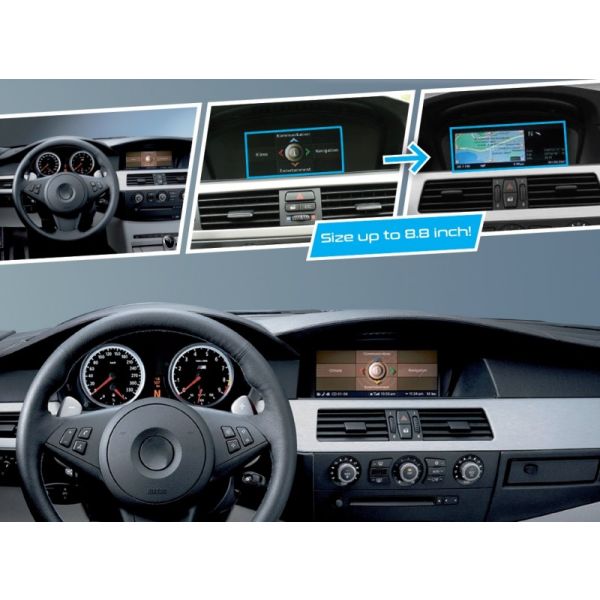
UPgrade your BMW iDrive CCC with a 8.8 inch High resolution capacitive touch screen without replacing the original iDrive system. The VividScreen has the same design as the
OEM iDrive Professional display, to maintain the OEM look.
OEM iDrive Professional display, to maintain the OEM look.
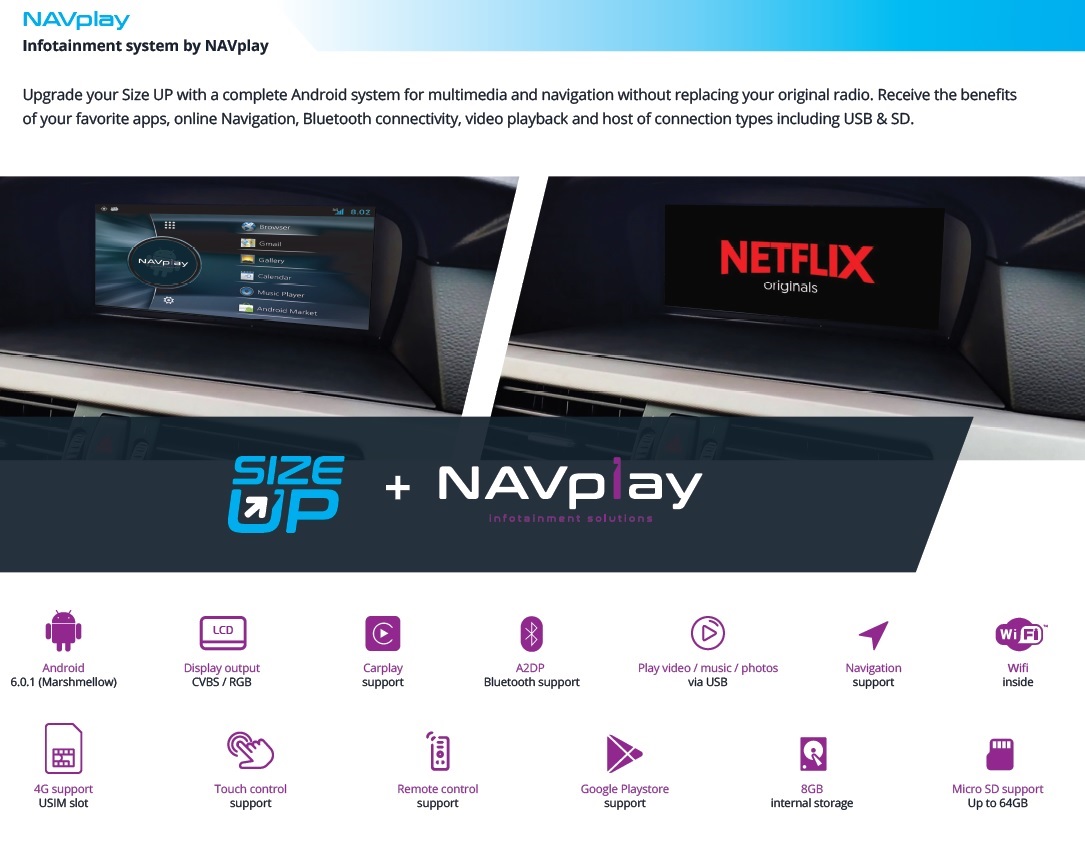
Upgrade your Size UP with NAVplay, a complete Android system for multimedia and navigation and enjoy all your favourite apps in the car. You can control the NAVplay via the Size UP touch screen.
Example video
Features
- LVDS input with touch screen support (NAVplay or CARplay)
- HDMI input (for Mirrorlink or Apple TV)
- HDMI input (for Mirrorlink or Apple TV)
- Audio/Video input
- Rear camera input
- Dynamic Parking Lines (IPAS)
- Picture in Picture from Parking sensors (PiP)
- Front camera input
- 1280x480 Resolution
- FM Audio Transmission output
- Use OEM iDrive button to enter screen inputs
- Rear camera input
- Dynamic Parking Lines (IPAS)
- Picture in Picture from Parking sensors (PiP)
- Front camera input
- 1280x480 Resolution
- FM Audio Transmission output
- Use OEM iDrive button to enter screen inputs
- 2 Year warranty & Support

EXCLUSIVE INTERFACE FEATURES
Features:
- 2* AV input
- Audio output select
- Image retention while driving
- Adjustable parking lines via OSD menu
- Image retention while driving
- Adjustable parking lines via OSD menu
- Activation interface via original iDrive buttons
- OSD menu

EXCLUSIVE NAVplay FEATURES
Extend your Size UP with a complete Android system for multimedia and navigation and enjoy all your favourite apps in the car. All the original features are retained.
The interface is equipped with various options such as; navigation, USB connection for film and music, Carplay/Android Auto, WiFi, Audio/video input, camera input, audio/video output, etc. You will have all the features of an Android tablet integrated on your original screen of your vehicle!
The interface is equipped with various options such as; navigation, USB connection for film and music, Carplay/Android Auto, WiFi, Audio/video input, camera input, audio/video output, etc. You will have all the features of an Android tablet integrated on your original screen of your vehicle!
Features:
- Supports Android Play-Store (Various applications supported)
- Customize your navigation with your own Apps from the App store
- Customize your Home screen with fast buttons to access your Apps
- Side navigation bar to control your Android system
- 1x Microphone connection for voice recognition (microphone optional)
- 1x Speaker connection (speaker included)
- GPS connection to navigate without internet access (GPS antenna included)
- Multiple ways to store data and communication ports (2x USB 2.0 & 1x microSD Slot)
- Support 3G & 4G via uSIM slot (antenna included)
- Wifi hot spot (antenna included)
- Setting menu to change your display, Apps and other settings
- Customize your navigation with your own Apps from the App store
- Customize your Home screen with fast buttons to access your Apps
- Side navigation bar to control your Android system
- 1x Microphone connection for voice recognition (microphone optional)
- 1x Speaker connection (speaker included)
- GPS connection to navigate without internet access (GPS antenna included)
- Multiple ways to store data and communication ports (2x USB 2.0 & 1x microSD Slot)
- Support 3G & 4G via uSIM slot (antenna included)
- Wifi hot spot (antenna included)
- Setting menu to change your display, Apps and other settings
NOTES
- It is essential to have an Aux-in
- We recommend that the installation will be performed by a qualified specialist
- Check the other tabs for "Compatibility" - "Package contents" - "Product specifications"
Not available
COMPATIBILITY
CAR
This kit is compatible with the following models:
BMW
| 3 serie (E90/E91/E92/E93) | 2005-2009 | iDrive CCC Professional & Business (6.5" & 8.8") |
| 5 serie (E60/E61) | 2003-2009 | iDrive CCC Professional & Business (6.5" & 8.8") |
| 6 serie (E63/E64) | 2004-2009 | iDrive CCC Professional & Business (6.5" & 8.8") |
| *Picture in picture option only compatible with 8.8" iDrive screen. | ||
| *Rear select via CAN-BUS only available with automatic gearbox | ||
| *For manual gear please use CAN-BUS interface for reverse gear signal. | ||
REQUIREMENT
|
AUDIO OUTPUT |
The interface inserts ONLY video signals into the infotainment. It is essential to have an Aux-in, when using audio from an external AV source. |
|
CVBS |
Only compatible with NTSC sources. |
|
LVDS |
LVDS input is compatible with NAVplay & CARplay module |
|
SCREEN |
Interface is compatible with 6.5” & 8.8” |
|
FRONT CAMERA |
The front camera input will automatically switch after leaving the reverse gear. You can set the display time in seconds via the OSD menu (1-15 sec). It is also possible to select the FRONT camera input manually |
|
OEM REAR CAMERA |
The interface does not switch back automatically to the OEM rear camera input when the reverse gear is engaged. |
|
GUIDELINES |
iPAS & Static lines are available via the interface OSD menu |
|
PIP |
We recommend that the installation will be performed by a qualified specialist |
|
REAR SELECT CAMERA INPUT |
Interface will respond on CAN for cars with auto gearbox. When manual gear box please use the rear detection wire. |
|
INSTALLATION |
We recommend that the installation will be performed by a qualified specialist |
PACKAGE CONTENTS
The following is provided in the set:
REP-BMW-E60
Package:
- Monitor CCC 8.8”: 1x
- Interface (main e60): 1x
- LVDS cable (HLVDSC0044): 1x
- A/V RGB cable (HARETC0239): 1x
- Mode button: 1x
- MFTX antenna (HARETC0184): 1x
- Remote: 1x
- Manual: 1x
- Service instructions: 1x
Option:
1: A/V cable
Start a Conversation
Hi! Click one of our members below to chat on WhatsApp
- The team typically replies in a few minutes.